Outline
- What is Terraform?
- Related technology
- Creating your first stack
- VPC
- Subnets
- Instances
- ELB
- Demo deploy
- Tips and tricks
- Terraform at Shopify
What is Terraform?
- Infrastructure as code
- Understands dependencies between resources
- Group collections of resources together as a module
- Expose information about stacks via outputs
Related technology
- CloudFormation
- AWS only
- Proprietary
- Chef, Puppet, Ansible
- Mostly focused on config management and application orchestration
- Plugins for infrastructure
Creating your first stack
- Setting up a VPC
- Adding subnets
- Adding instances
- Adding an ELB
- Deploy!
Creating your first stack
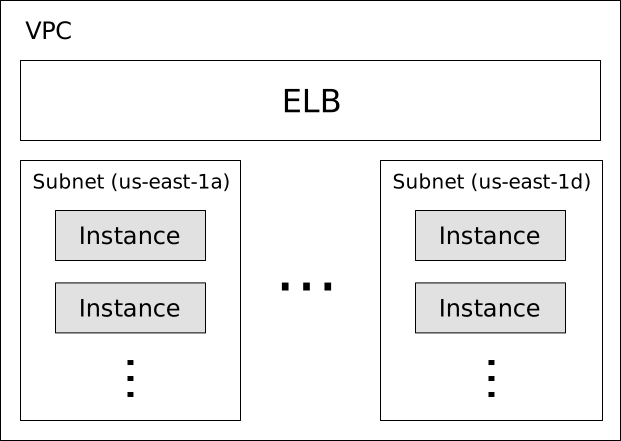
Creating your first stack – Provider
provider "aws" {
  region = "us-east-1"
}
providerblocks configure any of the supported resource providerschef,google(cloud), and many other providers come by default- Some read in environment vars for config. For example,
AWS_ACCESS_KEY_IDandAWS_SECRET_ACCESS_KEY
Creating your first stack – VPC
resource "aws_vpc" "main" {
  cidr_block = "10.0.0.0/24"
}

resource "aws_internet_gateway" "gw" {
  vpc_id = "${aws_vpc.main.id}"
}
${…}is an interpolation- Other resources referenced in an interpolation via
${type.name.attribute}
Creating your first stack – Subnets
variable "azs" {
  default = "b,c,d,e"
  description = "Availability zones to use for subnets"
}

resource "aws_subnet" "public" {
  count = 4
  vpc_id = "${aws_vpc.main.id}"
  map_public_ip_on_launch = true
  cidr_block = "${cidrsubnet(aws_vpc.main.cidr_block, 2, count.index)}"
  availability_zone = "us-east-1${element(split(",", var.azs), count.index)}"

  lifecycle {
    prevent_destroy = true
  }

  tags {
    Name = "Public Subnet"
  }
}
- Variables are inputs to your terraform stacks and modules
countis a special attribute to support multiplicity of resourceslifecycleis also a special attribute, here preventing the resource from being destroyed (terraform destroy, from changing a ForceNewResource attribute)- Interpolations can use functions, like
cidrsubnet
Creating your first stack – Route table
resource "aws_route_table" "public" {
  vpc_id = "${aws_vpc.main.id}"
}

resource "aws_route" "internet" {
  route_table_id = "${aws_route_table.public.id}"
  destination_cidr_block = "0.0.0.0/0"
  gateway_id = "${aws_internet_gateway.gw.id}"
}

resource "aws_route_table_association" "public" {
  count = 4
  subnet_id = "${element(aws_subnet.public.*.id, count.index)}"
  route_table_id = "${aws_route_table.public.id}"
}
resource.name.*.attris a splat, used whencount > 1- Routes can be specified in the route table itself, but using the
aws_routeresource simplifies future additions / removals
Creating your first stack – Instances
resource "aws_security_group_rule" "allow_all_ssh" {
  security_group_id = "${aws_vpc.main.default_security_group_id}"
  type = "ingress"
  from_port = 22
  to_port = 22
  protocol = "tcp"
  cidr_blocks = ["0.0.0.0/0"]
}

resource "aws_instance" "www" {
  count = "${var.num_instances}"
  ami = "${var.ami}"
  instance_type = "${var.instance_type}"
  subnet_id = "${element(aws_subnet.public.*.id, count.index)}"
  key_name = "${aws_key_pair.deploy.key_name}"
  user_data = "${file(concat(path.module, "/user_data.sh"))}"

  tags {
    Name = "web-server-${count.index}"
  }
}
elementwraps around the input list- Allowing all SSH will simplify our deployment resource, which will connect directly to the instance via SSH
- We read in the userdata script with the
filefunction, a script that will set up nginx
Creating your first stack – ELB
resource "aws_elb" "www" {
  name = "www"
  instances = ["${aws_instance.www.*.id}"]
  subnets = ["${aws_subnet.public.*.id}"]
  cross_zone_load_balancing = true
  security_groups = [
    "${aws_vpc.main.default_security_group_id}",
    "${aws_security_group.allow_elb_http.id}",
  ]

  listener {
    instance_port = 80
    instance_protocol = "http"
    lb_port = 80
    lb_protocol = "http"
  }

  # health checks

  tags { Name = "www" }
}
- Some resources have "nested blocks" for configuration
- For
aws_elb, we can have multiplelistenerandhealth_checkblocks - We still need square brackets around interpolations that produce lists so that we pass schema validation
Creating your first stack – Deploy
resource "null_resource" "deploy" {
  count = "${var.num_instances}"

  connection {
    user = "ec2-user"
    host = "${element(aws_instance.www.*.public_ip, count.index)}"
    agent = true
  }

  provisioner "remote-exec" {
    inline = [ "rm -rf ~/www && mkdir ~/www" ]
  }

  provisioner "file" {
    source = "${template_file.local_www_path.rendered}/"
    destination = "/home/ec2-user/www"
  }

  provisioner "remote-exec" {
    inline = [
      "sudo mv /home/ec2-user/html/* /usr/share/nginx/html",
      "sudo service nginx reload"
    ]
  }
}
local_www_pathexists solely to strip an optional trailing slashconnectionblocks specify how provisioners will connect to a resource- Normally configured by the provider, but sometimes the defaults aren't sufficient
- Can be placed inside a provisioner for local configuration
Demo
Tips and tricks
- Variables are only strings (for now), so to support lists you can join on a delimiter when passing a value into a module and split within the module
- No support for conditionals, but you can use interpolations in certain ways to simulate them (e.g., ternary operations)
- Never do a raw
terraform apply, but rather output a plan file fromterraform planto use - State can be stored in many ways, but git is perhaps the simplest
- Use vars files to switch between different environments (e.g., production, staging)
Terraform at Shopify
- Manage a ~100 instance cluster of nodes (over-provisioned for flash sales)
- Went from time to scale time taking ~1 hour to just a few minutes
- DNS plugin for reading TXT records
- Chef plugin for creating/delete chef nodes and clients
- Wrapped Terraform binary to ensure best practices
More information
- Official documentation
- Official repository
- Community modules
- Shopify DNS provider
- IRC:
#terraform-toolon Freenode
Thanks for listening!
❤️ ❤️ ❤️ ❤️ ❤️ ❤️